Blog
Blog
What are wireframes and why do we use them?

Robert Brans
Digital designer
Published
30 October 2026
Reading time
6 min read
When we develop a website or app at Partout, we use wireframes. But what exactly is a wireframe? In this blog we explain what wireframes are and how we use them. We also show you why wireframes matter and what their benefits are.
What is a wireframe?
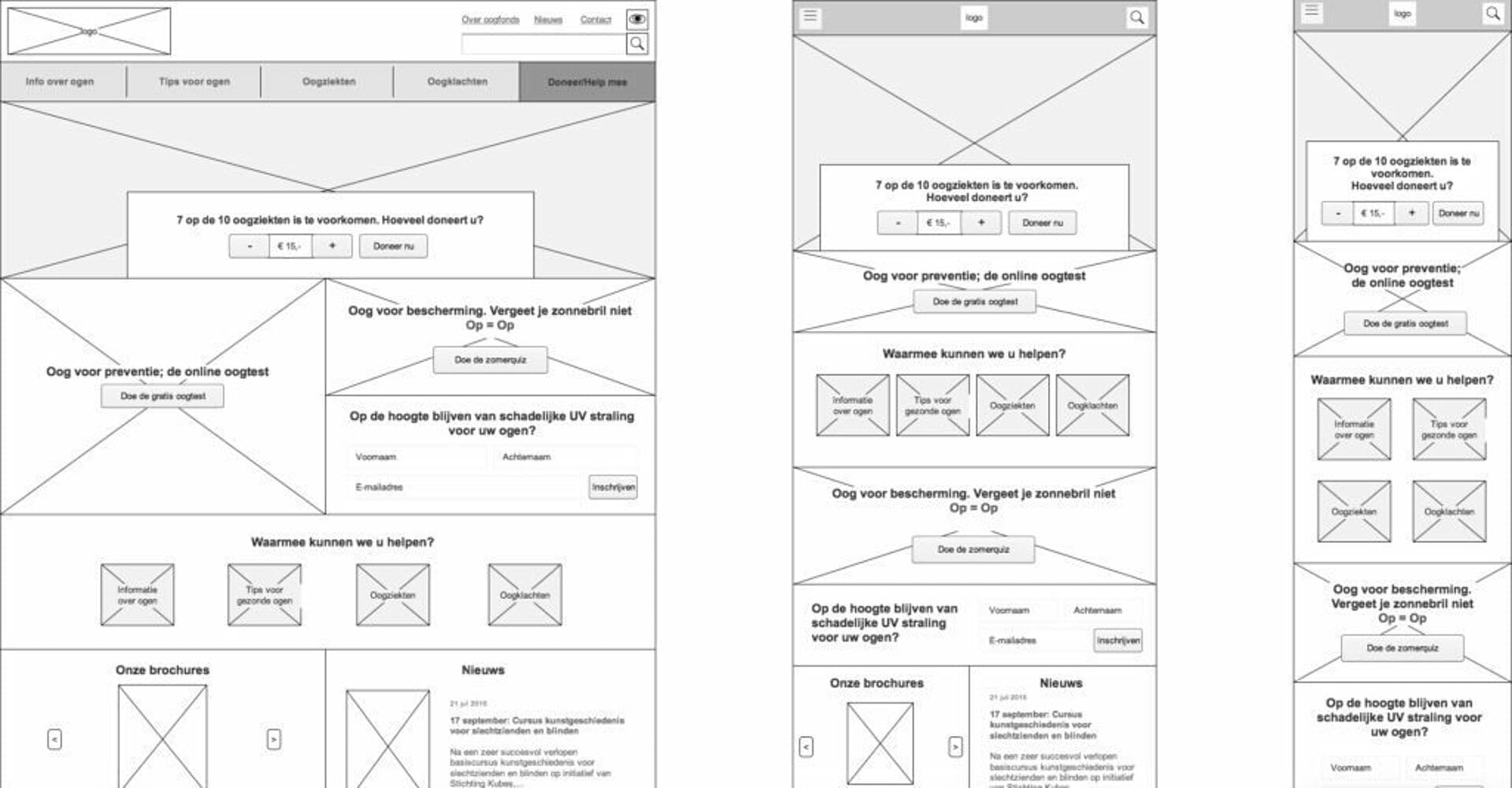
A wireframe is a schematic framework of a website, app or page. It is essentially a kind of blueprint. Wireframes are created to give every element and function on a screen a logical place without being ‘distracted’ by visual elements. That is why wireframes (usually) lack colour, typographic styling, photography and illustrations, and focus instead on the function, behaviour and hierarchy of content. In short, the emphasis is on what a screen does, not how it looks.
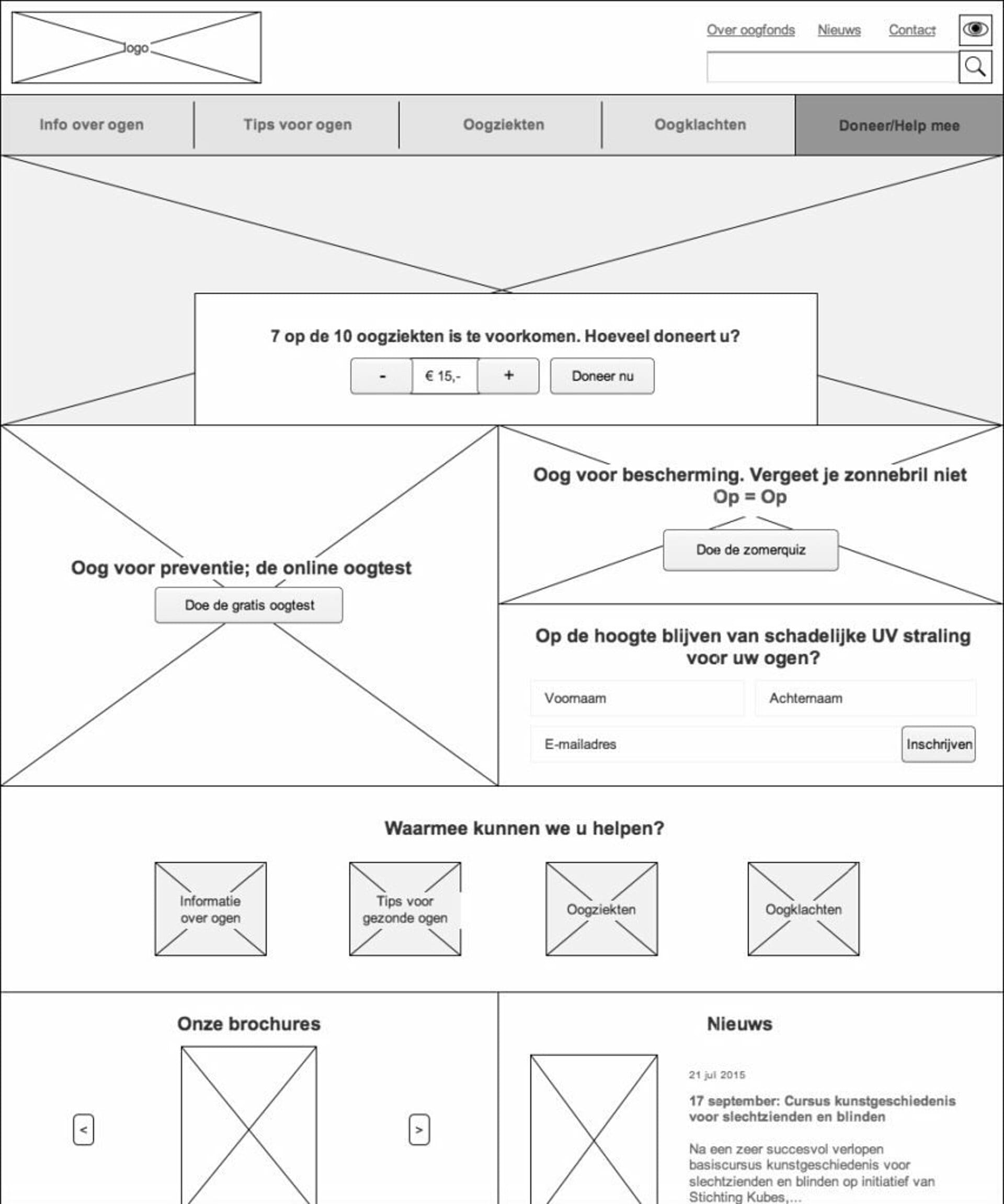
A wireframe focuses on:
- Defining (all) the functionality of a site
- Showing the relationships and priorities/hierarchy between information and functionality (layout)
- Setting the rules for how certain information is displayed
When do you use a wireframe?
As soon as the goal of your website is clear and you have defined the top tasks and functionality (for example by mapping a customer journey), you can set up a wireframe.
Creating a wireframe
The quickest way is to sketch it on paper. That is ideal for the rough layout or initial ideas. However, adjusting and reusing elements is a bit trickier that way. That is why people quickly turn to digital tools such as Axure, Miro or Figma.
Block diagram
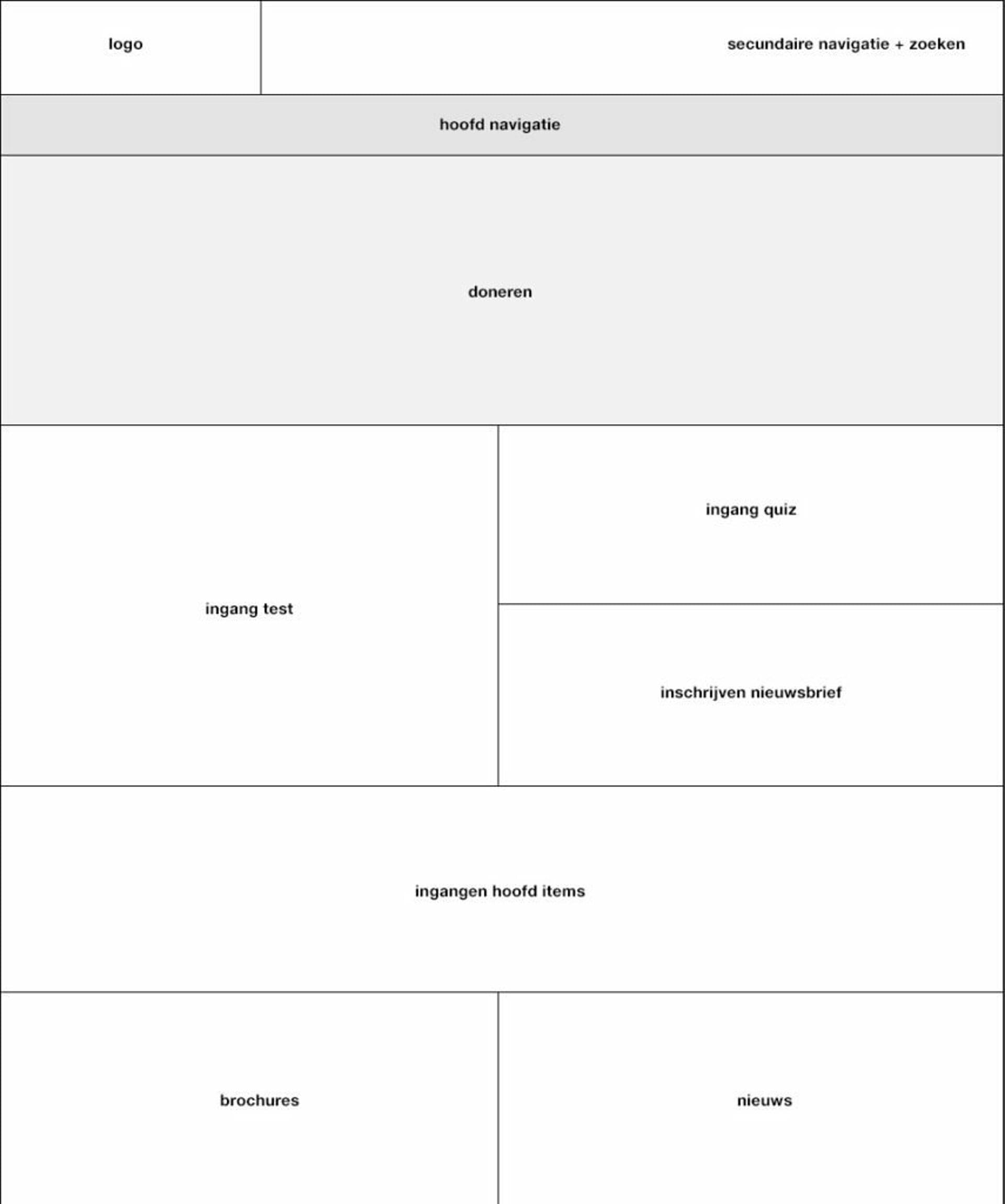
First, you set up what is known as a 'block diagram'. In it, you broadly determine the layout of the page, for example the navigation at the top, content in the middle, with the top tasks at the top of the hierarchy and the footer at the bottom.
You then add the details to the block diagram. For example, how many and which items go in the navigation, and what types of information go in the content area. This is how the block diagram is filled in until it becomes a complete wireframe. Throughout, you keep checking whether the defined goal, top tasks and functionality still hold.
Types of wireframes
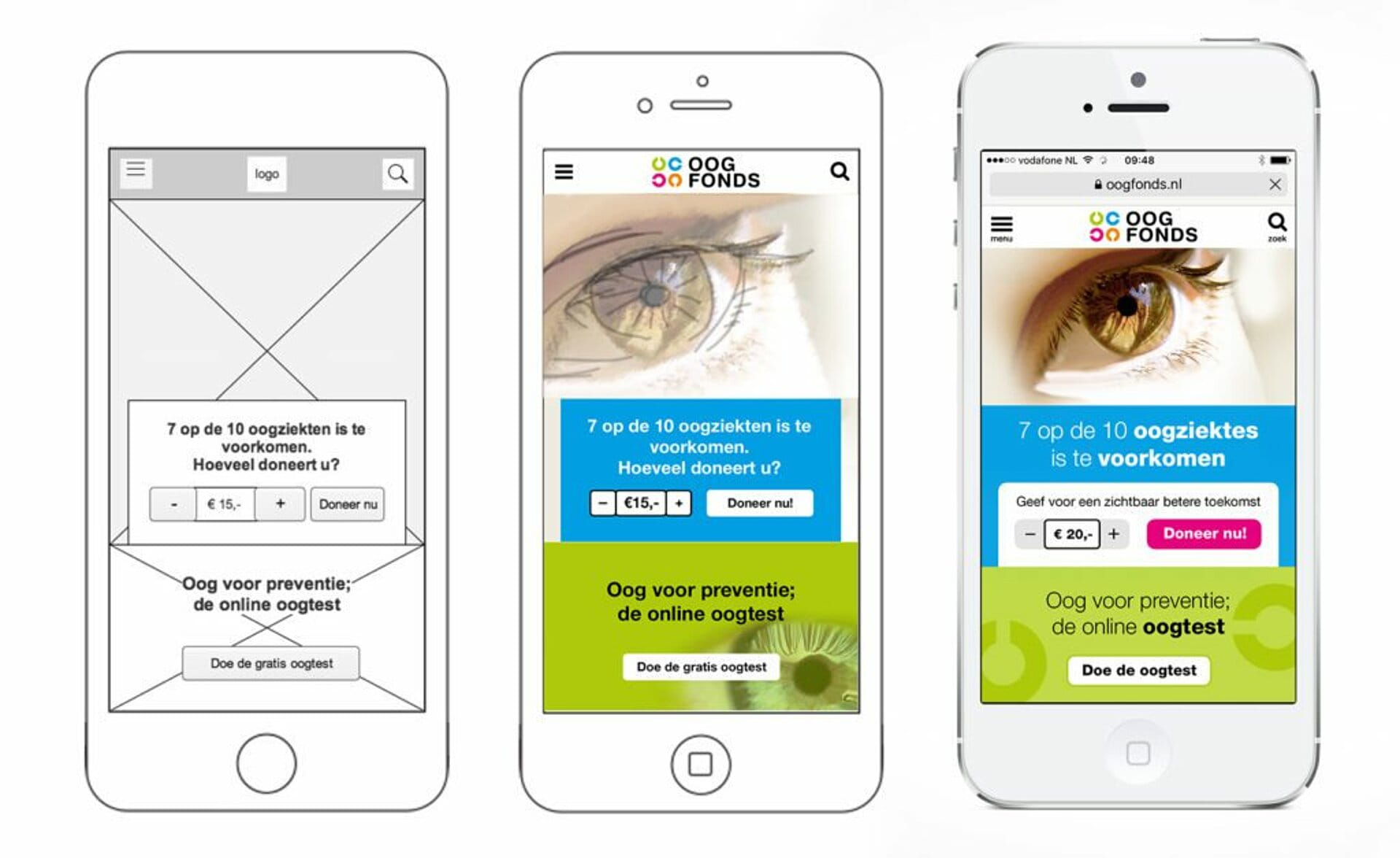
Wireframes can have different levels of detail. These levels indicate how close a wireframe comes to the final product. We can divide them into low-fidelity and high-fidelity.
Low-fidelity
A low-fidelity wireframe is a simple, abstract black-and-white wire model that uses only shapes, lines and mostly dummy content (for example Lorem ipsum text and grey boxes as photo placeholders). These wireframes are quick to set up, so you soon have a rough picture of the layout of the site, page or app.
High-fidelity
High-fidelity wireframes are more detailed, with actual headings, body text, button copy, shades of grey (to create hierarchical distinction) and sometimes even some colour, logos and photos.
Prototype
In some cases, a clickable model of the wireframes is also created. This means you can click between the individual pages and elements. For example, working navigation or buttons that perform an action. This can even go as far as adding animations and advanced interaction to a wireframe. That way, usability and experience can be partly tested. Obviously, these wireframes can no longer be put on paper or printed out: they are (almost) working prototypes.
Elements of a wireframe
The skeleton of a website can be divided into 3 elements: information hierarchy, information design and interface design. The page layout is where these elements come together. The wireframe makes the relationship between these elements clear.
Information hierarchy
This is where the navigation between and within the pages of a website is determined. It should also make clear the relationship between navigation elements and links. Main items, sub-levels and even deeper structures, and how they are accessed, all have their place here. This is often the step before creating the wireframes, using a sitemap.
Information design
Information design is the presentation, placement and prioritisation of information so that it is understandable and logical. The information must be presented in a way that leads to clear communication. It should always serve the user's goals and tasks.
Interface design
'User interface design' is the design and arrangement of the elements users need to work with (interact with) the functionality of a page. The aim is to create a user-friendly, clear and efficient experience. Commonly used interface elements include buttons, input fields, drop-down menus, etc.
On websites that rely heavily on experience, you often see interactions that go too far to include in a wireframe, such as parallax movement while scrolling or 'drag and drop' behaviour in web games or apps. ‘Pinch to zoom’, which you use on touch devices to zoom in on maps, for example, is also beyond a standard wireframe. It can, however, be built into a prototype.
Why wireframes?
Creating wireframes saves time and money in the end. However small the project, it always pays to create wireframes first. For large, complex sites they will of course need to be more extensive and detailed. But even for a simple website, it is advisable to capture the pages quickly and easily in wireframes.
Overview
Creating wireframes makes it easy to keep track of how many pages (or page types) a site has. It also makes it easy to see how these pages relate to one another (sitemap/structure). Thanks to the visual representation of this overview, it is clear to everyone involved whether all the top tasks, goals and functionality are covered. Ultimately, this saves time because you don't overlook anything.
Reuse
Recurring functions or elements are easy to spot (early on) and can therefore be reused. This saves time and money, because certain things don't have to be designed or built more than once (slightly differently each time).
Quick to adjust
A wireframe is often quicker to adjust than a fully worked-out visual design or an already coded page. Thanks to the simple set-up of wireframes, changes can be made at an early stage that would be far more complex or time-consuming later in a project. That is why it is worth investing a little more time in a wireframe and setting it up properly. That way you can avoid having to make complex and costly changes to the design or development at a later stage.
Getting started with wireframes
Creating wireframes has its advantages. It saves you time and money, because a wireframe is often quicker to adjust than a fully worked-out visual design or a coded page. It also gives you an overview and makes it easy to reuse elements or functionality.
We are Partout
We are a B2B marketing agency in Eindhoven. We make sure B2B companies land on the shortlist of their ideal customers, especially in complex buying processes where others get stuck. We combine branding and demand generation so you become a brand in demand. Instead of just chasing leads, we build a brand that is seen, trusted and chosen.