
Blog
Blog
Optimising for Google Discover: our 15 tips!

Evie van Rooij
Search marketeer
Published
30 October 2026
Reading time
16 min read
In today's business market, the reality has changed. Buyers are already 80% of the way through their research before they ever speak to sales. That means your company needs to be present wherever your target audience is looking for information. One of those places is Google Discover, the proactive counterpart of the Google search engine.
Here, you push valuable insights into the user's feed based on their interests and behaviour. In this article, we explain how to use this channel to get your brand onto the shortlist of your ideal customers.
What is Google Discover?
Google Discover is the former Google Feed, Google's attempt to compete with the feeds of Facebook and Instagram. Instead of you searching for content yourself, Google proactively shows you content that may interest you.
The more you use Google Discover, the better Google understands which content you find interesting. It works a bit like the feeds on Instagram, YouTube and TikTok. Content that lends itself perfectly to this kind of push method includes news-related or other topical content. You'll come across a lot of news items in Google Discover, but there is room in the feed for more timeless content too.
Google Discover is part of the Google app for Android and iPhone. When you search for something in the Google app on your smartphone, you see pushed content below the search bar based on your interests. Or at least, the interests Google links to your profile. The more often you use the Google app, the better Discover can judge which content is relevant to you.
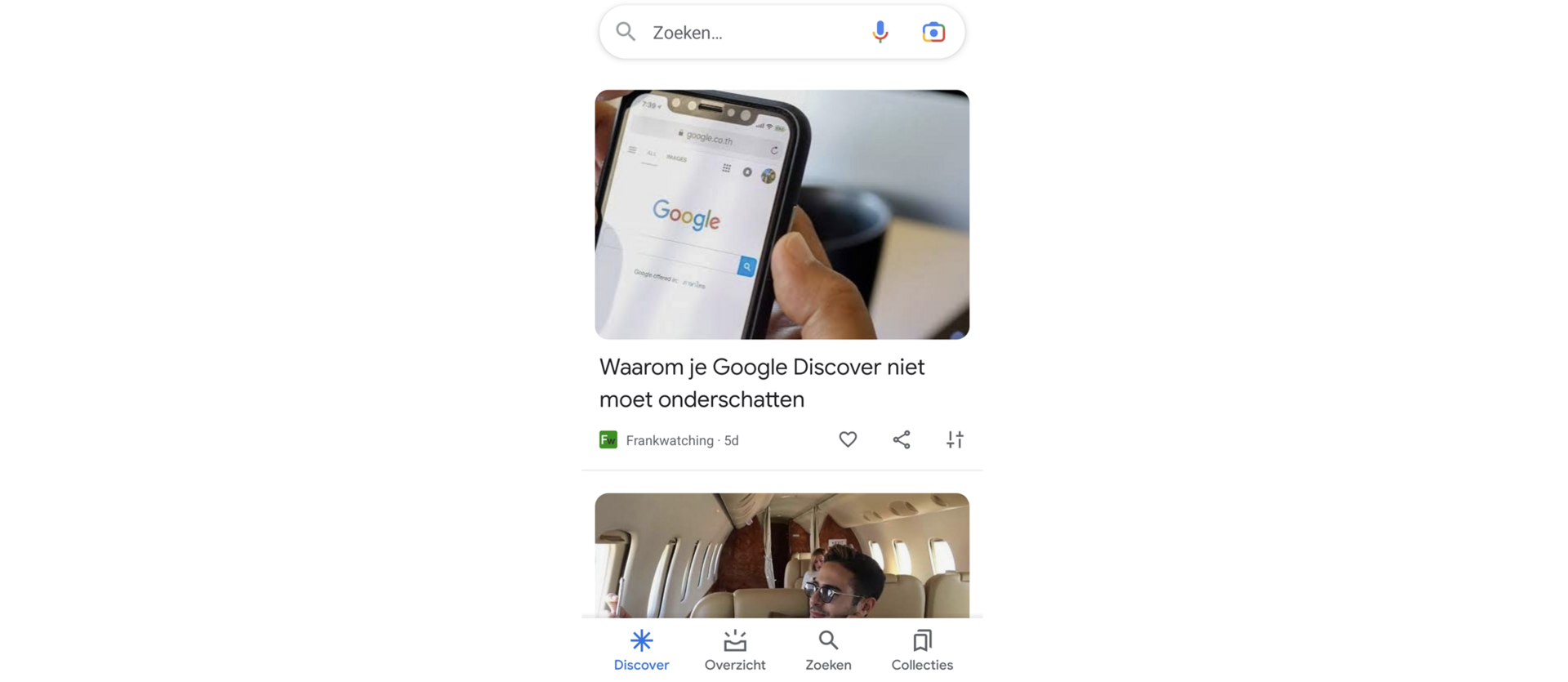
Because you almost always use Google Discover on your phone, it is a great way to stay visible during 'downtime' too. In other words, with relevant B2B content in your decision-makers' free time. That gives you a real advantage in getting onto your ideal customer's shortlist.
And as you'd expect from Google, Google Discover shows both organic results and paid results.
Organic results
Just like in the 'regular' Google search engine, organic results are judged on relevance and quality. Because Google Discover cannot work from search intent, what matters here is not how well content matches a search intent, but how relevant it is to a particular topic. To be shown organically in Discover, your content needs to be relevant to the topics the user is interested in, and of course it needs to be high quality.
Paid results
Not managing to get your content into Google Discover organically? Then there is always the paid option. An added benefit is that these ads appear not only in Google Discover, but also on YouTube and in Gmail. Discovery ads are particularly useful for promoting products or services, because that type of content rarely gets shown organically.
Ideally, of course, you appear in Google Discover both organically and through paid placements. An example:
You supply HRM software to small and medium-sized businesses. New legislation is coming into force that matters to your customers. You write an in-depth article about it, which gets shown organically in Google Discover.
On top of that, you'd like your specific software to appear in Google Discover through paid placements. In these ads, you can highlight the benefits that matter specifically for this legislation, with a call to action for a free demo or webinar.
How does Google Discover work?
So Google Discover tries to show you content that interests you. But how? Google Discover has its own algorithm behind it. This AI-driven algorithm works a bit like TikTok's. Based on your interests and your behaviour in the app, Google decides which content is relevant to you and shows you more of it.
Google also draws on information from other Google services you use (think YouTube, Google Maps and the 'regular' search engine). Your location and how topical a subject is also affect the content you see.
To determine your interests, Google Discover uses information from entities. These are concepts, or containers of concepts, that help Google (among others) understand what a web page or post is about. Search engines use entities to properly understand topics and see the connections between different topics. Exactly how entities work is too complex to explain in this article, but it is worth knowing that they play an important role in Google Discover. Want to know more about entities? This article gives you a clear picture.
Besides this push method, you can also influence what you see yourself. You do this by following certain channels in Discover. Google then shows you posts related to the topics you follow, so they are always relevant to you. After all, you manage them yourself.
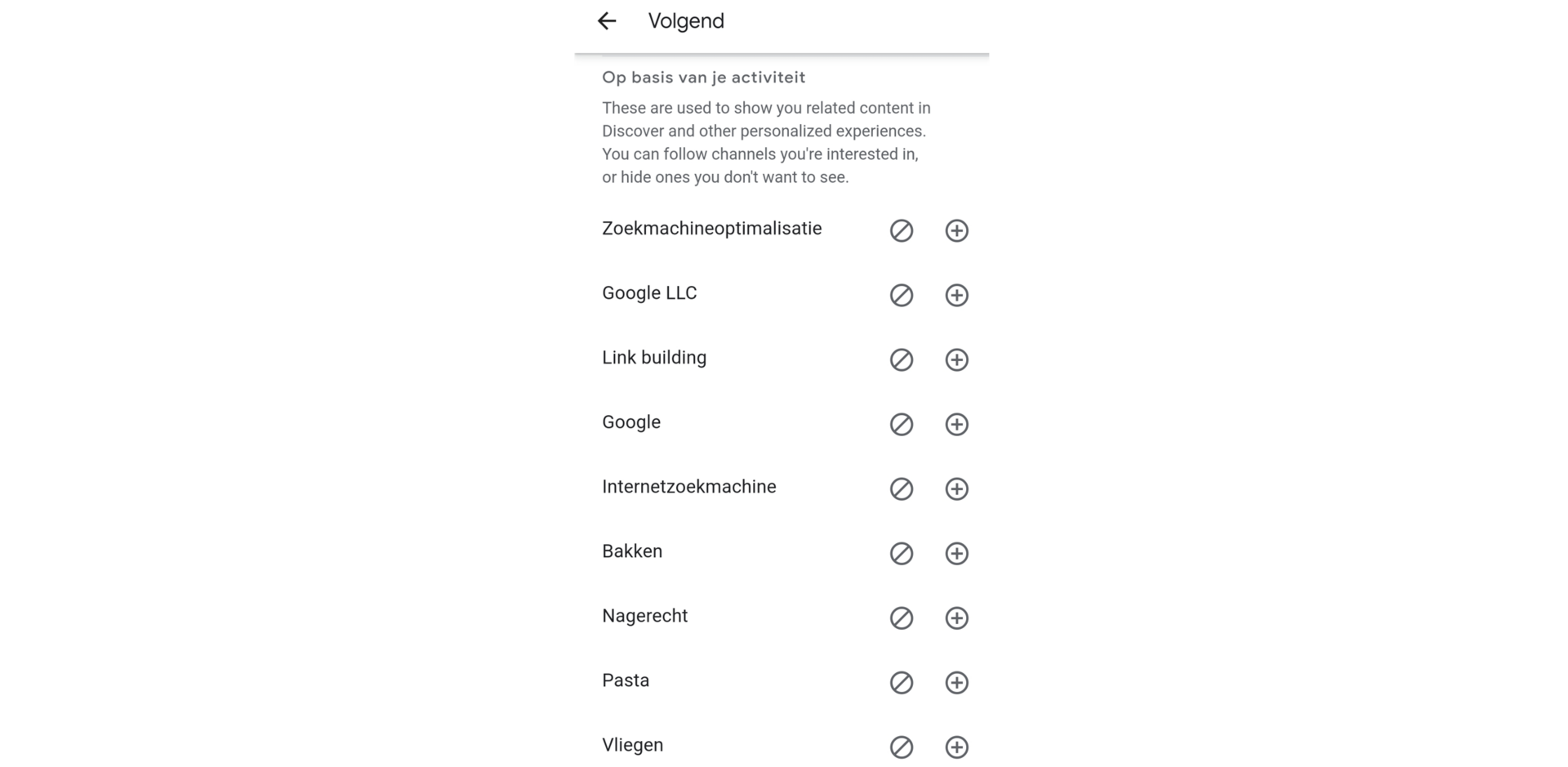
This way, Google delivers a variety of content that matches your interests. And although Google loves relevant and above all topical content, Google Discover is more than just another news feed.
What is the difference between Google News and Google Discover?
Unlike Google News, Google Discover brings together many different types of content, so it is certainly not limited to news. Google Discover does push topical content into your feed, including news items. But you'll also come across interesting blog articles, for example, as long as the content matches your interests.
While writing this article, I regularly searched for information about Google Discover, and as a result I now see it appearing in my Google Discover feed. In this case it isn't a news item, but this article is highly topical and relevant to me. So in this example, Google is working from my recent searches, which I didn't run in the Google app on my phone but in the browser on my laptop. Google looks at your behaviour across multiple devices and services and links it to your logged-in account.

Google Discover isn't interesting for every company
Now that you know a bit about what Google Discover is and how it works, you probably want to know whether it is interesting for your company. That depends. Not every market or company lends itself to content in Google Discover. In that case, it is a shame to invest a lot of time in it.
Want to be visible, but your company or content doesn't lend itself to visibility in Discover? Then Discovery ads may be a better option than organic optimisation for Google Discover.
How do you decide whether Google Discover is interesting for you?
That isn't an easy question, because in theory any website can appear in Google Discover. But should your website focus on it? In the following situations, there is probably a lot of untapped potential in Google Discover, and Discover could indeed be very interesting for your company:
- You have a lot of Help-related content on your website about the product or service you sell.
- Your website is well optimised for SEO, so it attracts a lot of search engine traffic.
- Your content is visually strong thanks to high-quality images and videos.
- Your website is fully optimised for mobile devices.
- You already get traffic from Google Discover.
Do one or more of the statements above apply to your website? Then Google Discover may well be interesting for you.
Your current content in Google Discover
Fortunately, you don't have to guess whether your current content is already suitable for Google Discover. In Google Search Console you can simply see whether your website is already getting traffic from Discover.
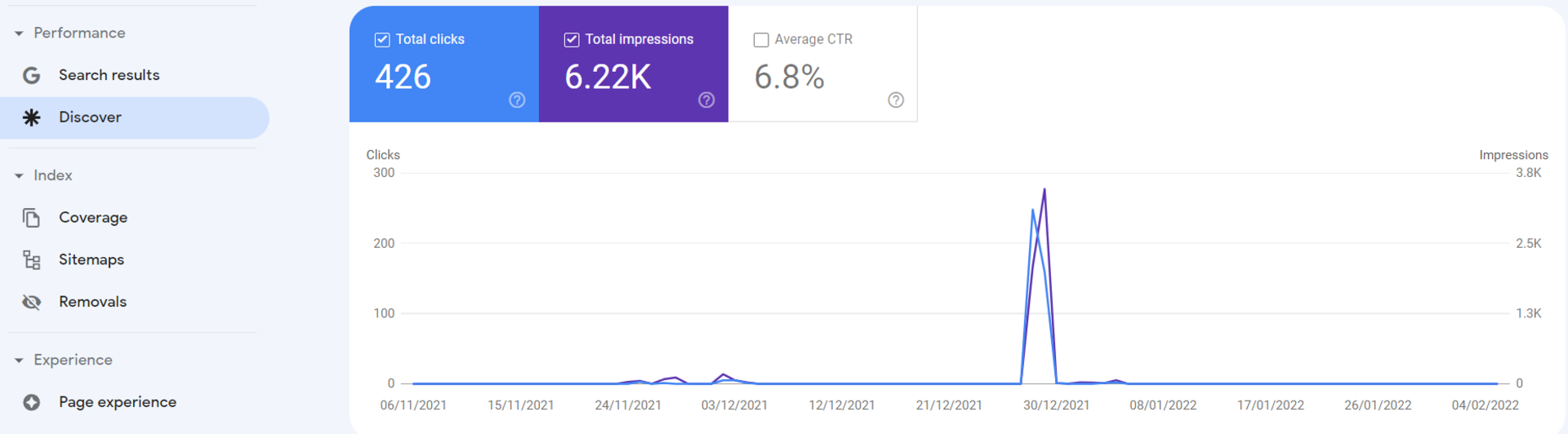
In the example above, the content isn't performing well in Google Discover yet, which is a shame, because you can see that it is possible. The key is to analyse what kind of content has been shown in the past, so you know what could work in the future.
As you can see, a combination of Google data and some scrolling of your own gets you a long way. In this example, the type of content on the website is suitable for Google Discover, but it isn't being shown yet. You'll read more about exactly how to optimise for Google Discover later on.
Discover which type of content performs in Google Discover
If you're lucky enough to already get traffic from Google Discover, you can get really useful insights from Google Search Console to find out which type of content ranks in Google Discover. The website in the example below, for instance, gets traffic from Google Discover on a more regular basis.
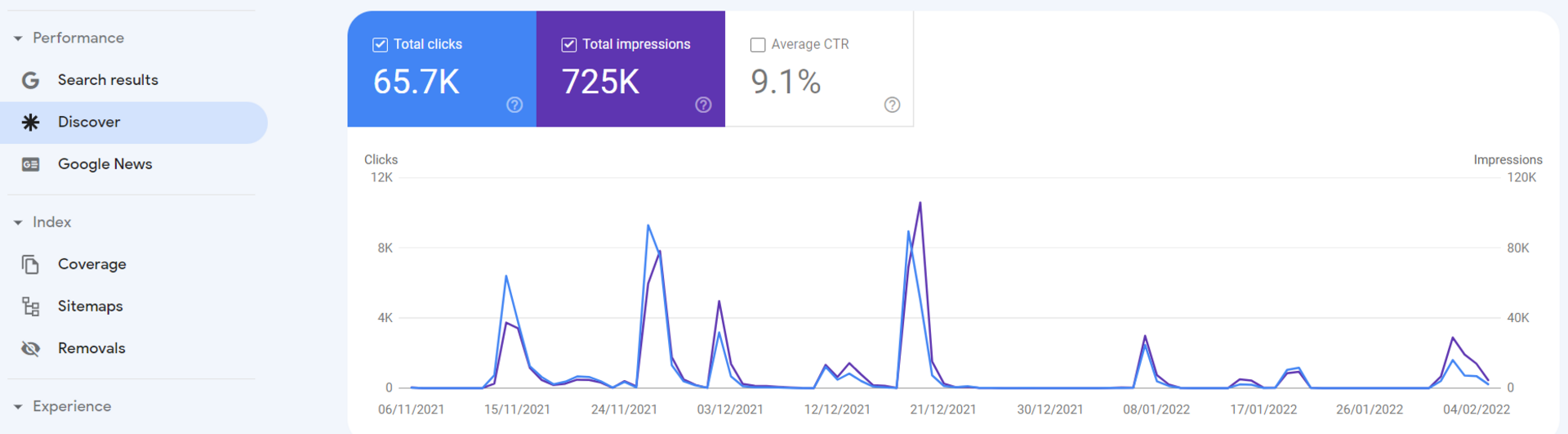
If you look at the pages this traffic lands on, you'll see that almost all of them are news items. So this website can focus on publishing relevant news items about topics people search for a lot.
It is hardly a surprise that news items do well in Google Discover. What is far more interesting is to look at which evergreen pages also perform well alongside the news items. That gives you important insights into what other kinds of information and page types could be relevant for Google Discover. Based on this, you can see whether more pages of this type could be created about important and frequently searched topics. A good start to a solid Google Discover strategy.
Google Discover ideas based on a competitor analysis
Alongside the insights you can get from Google Search Console, it is also well worth looking at what ideas you can get from Google Discover yourself and which content from your main competitors keeps appearing. You do that by simply scrolling and clicking around.
- Follow your competitors in Google Discover
- Click on the kind of content you want to see more of
- Google uses this to determine your interests
- Look up your competitors and analyse their topics and pages
- What are they doing differently from you?
- Do they take a different angle?
- Are their pages built differently from a technical point of view?
- Do their pages look different in layout and content?
- Do they write about different topics from you? Or do they cover them more completely?
This lets you look at your own Google Discover strategy and see where you can still sharpen it.
Optimising for Google Discover
You now know what Google Discover is, how it works and why you may or may not want to be visible in it. You also have an idea of the pages and the kind of content that suit Google Discover. Time to start optimising those pages and topics!
1. Complete your Google Business Profile
To appear in Google Discover, it is important to have a knowledge graph. Behind it sits a network of connected entities that Google Discover uses to recognise interests and show matching content. So how do you get a knowledge graph? By filling in your Google Business Profile as completely as possible. This helps Google understand as much as possible about your company, your services and your products. That way, entities (and therefore topics) can be linked to your company more effectively.
2. Mobile friendliness
Because Google Discover is a mobile app, it is essential that your website is mobile friendly. This doesn't only apply to the pages you want to appear in Discover with. These days, your entire website needs to be mobile friendly, even in the B2B market. Pages need to be as user-friendly as possible, and speed matters too. So check how your pages currently score on mobile friendliness and speed, so you know where there is room for improvement.
3. Focus on entities
Entities: we've mentioned them a few times already. But what exactly are they, and why do they matter so much for Google Discover? Entities are essentially a kind of tag that Google, among others, uses to label and map all the information on the internet. Connections are then made between these tags to understand the context of a topic. Google probably uses this principle for the 'regular' search engine as well, and certainly for Google Discover.
An example: if you Google the brand name 'VDL', you'll see who the current CEO is, among other things, but also which competitors you're likely to find interesting if you look up VDL Groep. Google knows this because all these competitors and the CEO are connected to the same entity. If you then search for the CEO's name, you'll see that he is the CEO of VDL Groep. So entities work in several directions. Once Google is clear about which entities you or your brand should be associated with, it can show you at the relevant moments.
But how do you know which entities exist and which ones to focus on? The Entity Explorer tool may help. Enter a topic and you'll get various suggestions for entities connected to it. In the example below, I entered 'online marketing' as the topic.

Writing an article you want to appear in Google Discover with? Then bear in mind that ideally you want to describe all those entities (briefly) in that article. That way, Google sees that the whole topic has been covered and that these entities (and therefore interests in Discover) are connected. Discover can then show your article as a result for all these different interests (topics and entities), but also when people search for the brand name or one of its competitors.
Another way to map these entities is to look at which related topics a search in Google Images returns.

4. Try to find niches within your industry
As is generally true for 'regular' search results too: the higher the search volume (and therefore the interest), the higher the competition. Are there niches in your market where competition is much lower? Then try to become the market leader there. But don't stray too far from your core business. After all, you want to attract relevant visitors.
Within these niches, competition is lower, so your chances of appearing in Google Discover for relevant topics are much higher! Be creative: there is a niche in your market too that hasn't been exhausted yet. Think about the different stages of the customer journey as well, and the various sub-topics that are interesting within the demand gen layer.
5. Fresh content
Google Discover loves topicality! That doesn't mean only news items are suitable for the Discover feed, but it does mean content has to be up to date: fresh content. Both evergreen and news-related content work well for Google Discover. This means you should regularly publish relevant news, events or trends. It also means you need to update your evergreen content regularly. Include this in the planning of your content calendar so you can be sure your articles stay relevant.
6. Anticipate trends and newsworthy content
Besides being fresh and up to date, topical and newsworthy content performs well. So make sure you stay on top of trends and developments in your industry. Tie in with relevant events and regularly publish newsworthy posts about research, developments and innovations in the market. You may find that difficult, but every industry or market has newsworthy topics to be found, so be creative!
7. High-quality and visual content
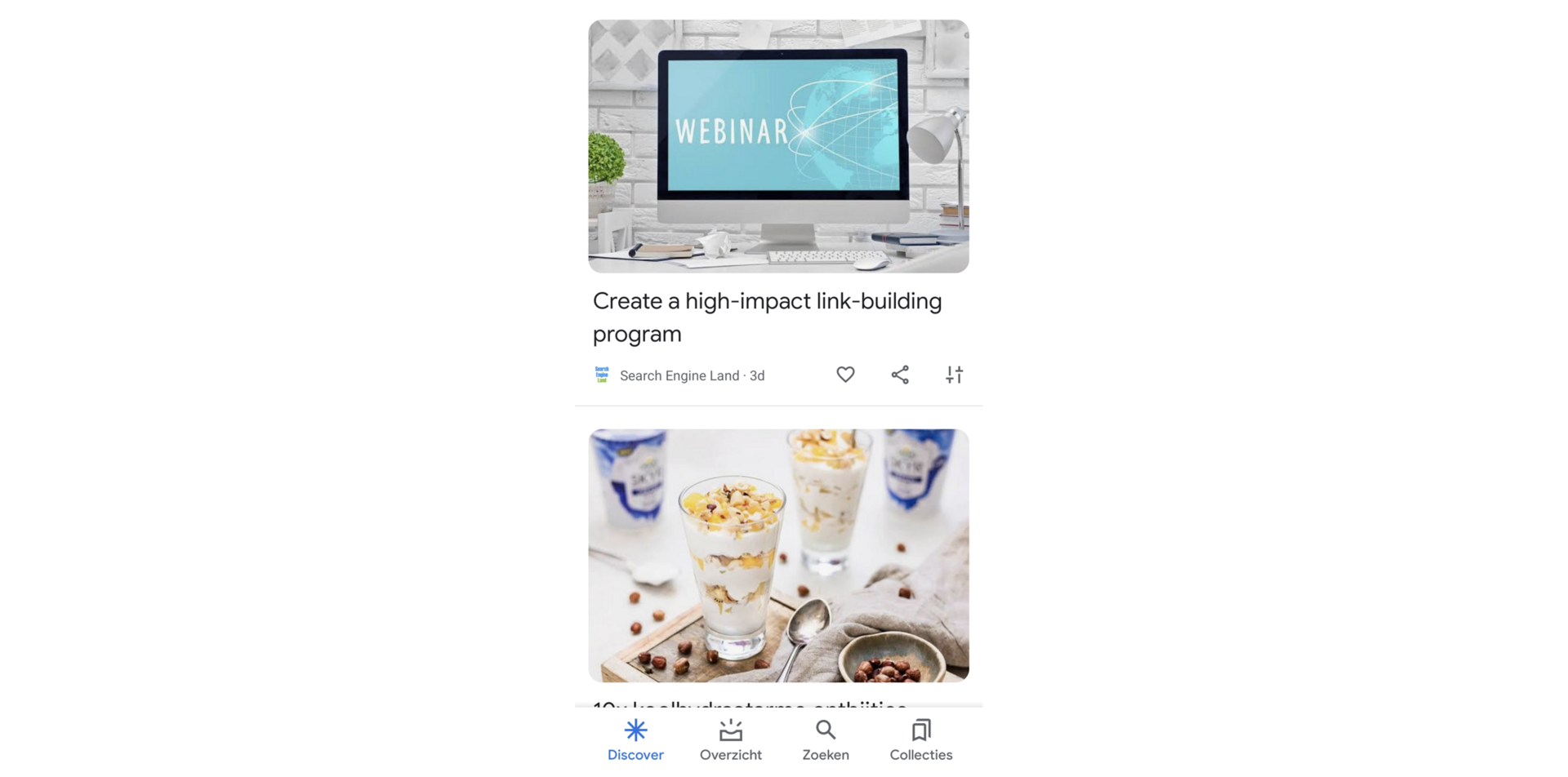
Google Discover is a visual app that shows a lot of images. So it makes sense to take visual aspects into account in your content. Use unique, high-quality images and videos above all. And make sure they actually add something to the written content. Visual content that adds no context to your page is of no use to the visitor, so Google won't reward you for it either. You can find plenty of inspiration in the visual content you already come across in the Google SERP or in Google Discover.
8. Optimise your Open Graph metadata
For results in Google Discover, Google uses the information you enter in the Open Graph metadata. This is where you make clear what your article is about. Keywords aren't all that important for Google Discover; what matters more is using the right words so Google recognises the entities. We briefly explained what entities are earlier in this article.
9. Make sure your E-A-T is in order
E-E-A-T (Expertise-Experience-Authority-Trustworthiness)is not an official ranking factor, but it does play an important role in how Google assesses the quality of your pages. In the guidelines Google uses to evaluate websites (the so-called rater guidelines), E-E-A-T is an important assessment criterion. And the same applies to Google Discover: the better and more trustworthy your content, the greater the chance it will actually be shown.
10. Follow the guidelines
As with all Google services: follow the guidelines! Google hates spammers and will penalise you for it on Discover too. So what are the most important guidelines for Discover? Simple: don't spread fake news and don't use clickbait. Go for high-quality articles and be as open and transparent as possible.
11. Different languages
This tip is mainly relevant for websites that operate in several countries and languages. Be aware that competition in the English-language version of Google Discover is much fiercer. Not only are there more websites competing for your target audience's attention, many of them are also better optimised for Discover.
Want to be visible in Google Discover in several countries? Then publish and optimise relevant content per country, market or language. That way you tailor your message more closely to your target audience and increase your chances of being shown in Google Discover. What's more, competition in Dutch is much lower than in English, which works in your favour.
12. Social engagement
Google Discover loves topical content and also looks at social media interaction. Is an in-depth article getting lots of engagement on LinkedIn, or is a YouTube video that gives more insight into your product or service getting lots of views? Then there is a good chance you can expect that attention on Google Discover too. It works the other way round as well. Suddenly getting lots of attention on Google Discover with a good video? Then there is a good chance it could take off on YouTube too.
13. Generate likes on your Discover content
Do you have followers and appear regularly on Google Discover? Then you want your followers to 'like' your content. They can do this by giving your content a heart. Write content that suits your followers, that is new and engaging. You can of course ask your followers for likes, but it is even better to earn them. This is also a signal that helps Google work out what kind of content matches your interests.
14. Monitor, analyse and improve!
You're never really “done” with Google Discover. Keep track of which content appears in Discover and how well it performs. Analyse which pages do well and dig deep to find out exactly what works so well there. Apply those insights to new content.
Also look at which pages don't appear in Discover when you expected them to. What is missing? How can you improve that content? In short: keep optimising, keep creating and stay visible.
With more than 800 million users, Google Discover is a channel you can't ignore. Want to get started with it? We're happy to help you shape an SEO strategy that fits your opportunities in Google Discover.
We are Partout
We are a B2B marketing agency in Eindhoven. We make sure B2B companies land on the shortlist of their ideal customers, especially in complex buying processes where others get stuck. We combine branding and demand generation so you become a brand in demand. Instead of just chasing leads, we build a brand that is seen, trusted and chosen.